


Build your skills taxonomy
- Who
- HR or L&D, with an Owner or Admin to load it
- Where
- Team/Org › Settings › Manage Skills
- Built in
- 12,000+ technical skills
- Help
- support@muchskills.com or the chat bubble
A skills taxonomy is the organised list of skills your organisation wants to map. It gives everyone the same words for the same skills, which is what makes search, gap analysis and planning trustworthy. This guide shows how to build one, role by role, and load it into MuchSkills.
How it works
A skills taxonomy is a structured list of the skills your organisation needs, grouped into categories, each skill with a short description. It creates a common language for skills, so that two people who mean the same thing pick the same skill.
A clear taxonomy gives you:
- Better hiring and resource planning
- Employee development and internal mobility
- Clearer role expectations and coaching conversations
- Consistent feedback and development frameworks
- Accurate skill gap and upskilling analysis
What is already in MuchSkills
Every profile has four built-in categories. You don't build these yourself.
| Category | What it holds |
|---|---|
| Job Focus | What each person knows well and enjoys working with |
| Technical skills | More than 12,000 software tools, programming languages and technical tools, maintained by MuchSkills |
| Soft Skills | Personal attributes that help people succeed at work |
| Certifications | External certificates, with issue and expiry dates and proof |
Your workspace also starts with a suggested taxonomy of custom categories, which you can rename, edit or remove:
| Category | What goes in it |
|---|---|
| Essential human skills | Soft skills, cultural abilities and behavioural competencies |
| Global skills | The hard skills you want to map across the organisation |
| Specialisations | One category per specialisation, for example Dev & Tech, Design & Product, Cloud and Infrastructure, and Data |
| Methodologies & frameworks | The methods, frameworks and laws your work depends on |
Depending on your business, you may add categories such as:
- Clients: map experience with each client to make staffing easier.
- Core competencies or service offerings: common in consulting firms, so resource planners see each consultant's specialty.
- Languages: loaded from a built-in template.
- My preferences and interests: travel, games, hobbies and sports, a good way for colleagues to connect.
For a complete example, download our example skills taxonomy for a fictional company, Acme Inc. It has 12 categories and 371 skills, and each category sheet is already in the upload format.
Before you start
- Collect your roles. Job titles, role descriptions or job adverts for the roles you want to cover.
- Collect existing frameworks. Competence models, service catalogues or client lists you already use.
- Agree who decides. Someone in HR or L&D should own the final list, with input from team leads.
- Role in MuchSkills: an Owner or Admin loads the taxonomy.
Steps
Plan the taxonomy
- List your roles and competence areas. For example Business Analyst, Marketing Manager and Frontend Developer, plus areas such as Leadership.
- Define the skills for each role. Write down the skills that matter most for each role, competence area or department. Our example skill list per role and competence area shows the format.
- Let AI draft lists if it helps. Use Create AI powered list in Team/Org › Analysis, or download our AI prompt template for role skill lists, replace the sample taxonomy in it with your own, paste it into an AI assistant and name the role. Review every result carefully: AI suggestions are a starting point.
- Group the skills into categories. Collect every skill from your role lists and sort them into categories. Each skill gets one name, spelled the same way everywhere.
- Write a short description for each skill. One sentence on what the skill means in your organisation.
- Leave out software and programming languages. They are already in Technical skills. Adding them elsewhere confuses people.
Load it into MuchSkills
- Open Manage Skills. Go to Team/Org › Settings › Manage Skills.
- Tidy the starter categories. Open each one. Click its name to rename it or edit its description, and remove skills or whole categories you don't need.
- Create the categories you are missing. Click Create Skill Category. The steps are in Create custom skill categories.
- Upload the skills. In each category, open the three-dot menu, choose Download template, fill in Name and Description, and upload it with Upload CSV file (max 100 skills).
- Set level descriptions where they differ. Click Edit skill level descriptions to adjust what the nine levels mean for a category, for example years of experience or language proficiency.
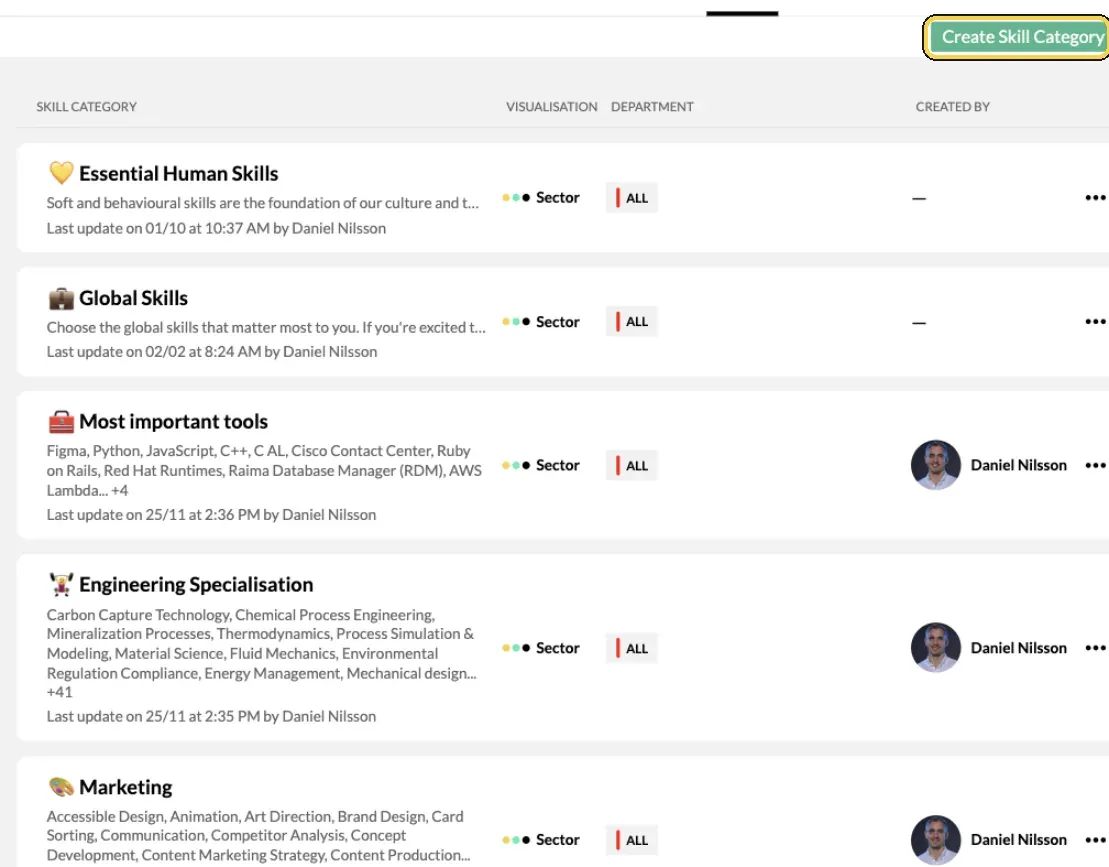
Team/Org › Settings › Manage Skills.
Put it to work
- Turn your role lists into analysis lists. Create one list per role or competence area in Team/Org › Analysis. See Define roles and competencies.
- Invite people. Once the taxonomy and roles are in place, invite your organisation. See Invite people to MuchSkills.
Check it worked
- Manage Skills shows your categories, each with its visualisation and departments.
- In My Skills, your categories appear under Skills my company wants me to specify, with their descriptions.
- When you add skills to an analysis list, your skills appear in the search under Custom skills.
Tips
- Start from roles, not from a blank page. Skills defined per role are easier to agree on, and they become your analysis lists later.
- Keep the technical database as it is. People enjoy adding the tools they use, and every language should stay available so everyone finds their own.
- Treat a duplicate as two names for one skill. The same skill in two categories is fine when the spelling is identical.
- Revisit the taxonomy when the business changes. A new service, client or method is a reason to add skills.
Help from MuchSkills
We are happy to help you create your taxonomy and define skills for your roles. Click the chat bubble in MuchSkills or email support@muchskills.com. Read more in our playbook What is a skills taxonomy and how do you create one?
Frequently asked questions
Do we need a finished taxonomy before we start?
No. Your workspace starts with a suggested set of categories you can edit, and the built-in Technical skills, Soft Skills and Certifications work from day one. A taxonomy of your own makes the set-up faster and the data cleaner, so it is worth building before you invite everyone.
How many technical skills are built in?
More than 12,000: software, programming languages and technical tools. MuchSkills maintains them. If someone can't find one, they type it in Technical skills and press Enter to request it, and we validate it.
Can we use our existing competence framework?
Yes. Its areas usually become categories and its competences become skills. Upload each category from a CSV file with a name and a description per skill.
Should each skill appear in only one category?
It can appear in two. Use exactly the same name and spelling in both, so it stays one skill. What you want to avoid is the same skill under two different names, such as Judgment and Judgement.
Can AI build the skill lists for us?
It can draft them. In Team/Org › Analysis, Create AI powered list suggests skills for a role from your taxonomy and common skills. Outside MuchSkills, our AI prompt template does the same with your taxonomy pasted in. Review every result before you use it.
Should we add languages?
We recommend it. Create a Languages category and use + Add template to load the built-in language list. People enjoy it, and it shows the range of languages across the organisation.
Can MuchSkills help us build the taxonomy?
Yes. We are happy to advise on your taxonomy and role definitions. Use the chat bubble in MuchSkills or email support@muchskills.com.