


Plan your workforce with skills data
- Who
- HR, L&D and leadership, with Owner, Admin or Analyst access
- Uses
- Analysis, Reports, Team Builder and My Growth
- Output
- A decision per gap: hire, upskill, redeploy or mentor
- Rhythm
- Review quarterly, or when your plans change
Strategic workforce planning asks whether you have the skills your plans need, now and next year. In MuchSkills you describe the capabilities as lists in Analysis, measure what you have, add project demand and the goals people are working towards, and turn each gap into a decision: hire, upskill, redeploy or mentor.
How it works
Strategic workforce planning answers one question: do we have the skills our plans need, now and in the next year or two? MuchSkills gives you the data for each step:
| Step | Where in MuchSkills |
|---|---|
| Describe the capabilities you need | Lists in Team/Org › Analysis |
| Measure what you have today | The Skills analysed and Members tabs of each list, and Team/Org › Reports › Skills |
| See what projects need | Team/Org › Reports › Skills › Demand, built from Team Builder |
| See what people are working towards | Team/Org › Reports › Growth |
| Check certificates the plan depends on | Team/Org › Reports › Certifications and Compliance requirements lists |
| Decide and act | Goals, learning material, Discover and Team Builder |
Because the data comes from live profiles, the plan stays current as people learn and move. You review it on a rhythm, and there is no spreadsheet to rebuild each year.
Before you start
- Access. An Owner, Admin or Analyst sees the whole organisation. The Demand report is for Owners and Admins.
- Profiles people keep up to date. Encourage everyone to rate their skills and review them after projects and courses.
- Your strategic priorities. Three to five capabilities your plans depend on.
Steps
Describe what you need
- Name the capabilities. Write down the capabilities your strategy depends on, for example Cloud architecture, AI literacy or People leadership.
- Create a list for each. In Team/Org › Analysis, create a list per capability, role or competence area. Use Company role for roles and General analysis for capabilities across roles. See Run a skill gap analysis.
- Set the bar. Add the skills and certifications, set Reqd. level where a level matters, and star the prioritised skills.
Measure what you have
- Read each list. On Skills analysed, look at the Distribution across Expert, Intermediate and Beginner, and the Percentage of people who have each skill.
- Focus on who can deliver. Switch off Beginner in the Distribution header to see only the people who can do the work today.
- Look for concentration risk. A skill held by one or two experts is a risk if they leave or move. Click the black part of the bar to see who they are.
- Split by group. Use Filter to compare departments, locations or tags. A gap may sit in one place only.
- See the trend. Choose a time range at the top of the list to see what people added recently.
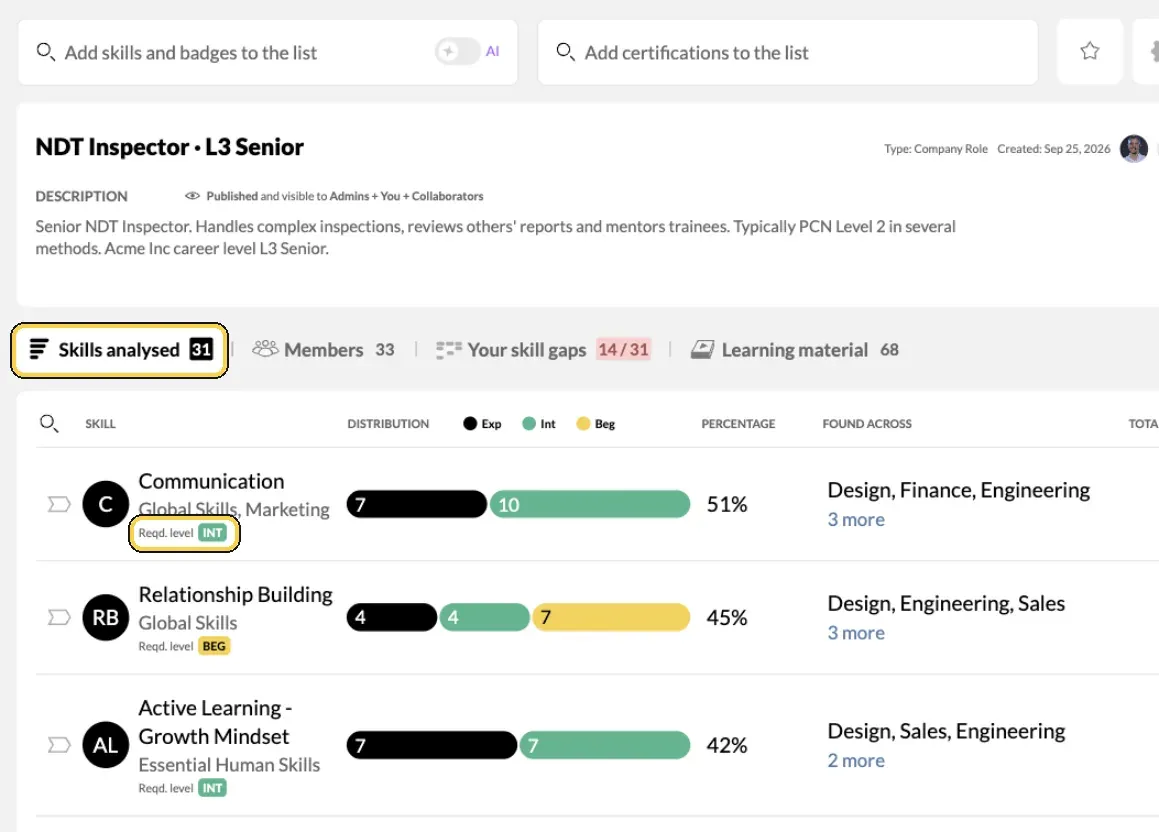
A role list in Analysis, with the required level per skill.
Add demand and direction
- Check project demand. Open Team/Org › Reports › Skills › Demand to see where your projects need more people than you have, level by level. See Find skill shortages with the Demand report.
- Check what people are working towards. Open Team/Org › Reports › Growth. Ongoing goals with deadlines in the coming months show gaps that are already closing, and Mentors requested shows where people want help.
- Check certificates. Open Team/Org › Reports › Certifications, and use Expiring to see what will lapse. For required certificates, a Compliance requirements list shows who holds them.
Decide and act
- Decide per gap. For each gap, pick one move and an owner:
- Upskill when people are close: set goals and link learning material.
- Redeploy when the skill exists elsewhere: find the people with Discover and staff them with Team Builder.
- Mentor when experts are few: pair them with intermediates who have goals in that skill.
- Hire when no one can grow into the gap in time.
- Make it personal. Publish the role and competence lists. Each employee sees their own fit in My Growth › Gap Analysis and can set a goal from there. Managers follow progress in My Circle.
- Review on a rhythm. Repeat steps 4 to 12 each quarter, or when your plans change. Use Export as CSV on a list to keep a record of each review.
Tips
- Start small. One capability done well beats ten lists nobody reads.
- Build on strengths. People do their best work in areas they are good at and enjoy. Use the data to put strengths to work as well as to find gaps.
- Look at experts and intermediates together. That is your delivery capacity. Beginners are your pipeline.
- Involve managers. Manager validation makes the data more reliable, and managers own most of the actions.
- Keep the plan in one place. Lists, goals and projects in MuchSkills replace the spreadsheet that goes out of date.
Further reading
These resources come with the training video for this guide:
- MuchSkills leadership training framework (presentation)
- Skills gap analysis: a complete guide
- How to build the strengths of your team members
- Upskilling: an 8-step guide to upskill your employees
- 7 steps to build strong and effective teams
Troubleshooting
| What you see | Why | What to do |
|---|---|---|
| The numbers look too low | Many profiles are incomplete or out of date | Ask managers to nudge their people from My Circle, and set up retrospectives |
| Demand is missing in Reports | The Demand report is for Owners and Admins | Ask an Owner or Admin, or work from Analysis lists |
| No capabilities demand data yet | No Team Builder projects have skill requirements | Add requirements to your projects, or plan without demand data |
| You see only part of the organisation | You are a manager, and see your own people | Ask an Owner or Admin for the Analyst role |
Frequently asked questions
Where do I start?
Start with your plans. Write down the three to five capabilities your strategy depends on, such as cloud migration, AI literacy or leadership. Then describe each one as a list in Team/Org › Analysis.
How is this different from a skill gap analysis?
A gap analysis measures one list. Workforce planning looks across several lists, adds demand from projects and the goals people are already pursuing, and ends with decisions and owners for each gap.
Can I see whether we are getting better?
Yes. Choose a time range on an Analysis list to see what people added in that period. Run the same review each quarter and compare.
Do I need project data?
It helps. Skill requirements on Team Builder projects feed the Demand report, which shows where projects need more people than you have at each level. Without projects, work from your Analysis lists alone.
How do I see what people are working towards?
Team/Org › Reports › Growth shows goals by status: open, planned, ongoing and completed, and how people want to reach them. In Team/Org › Overview, a category card can also show goals instead of skills.
Should employees see the analysis?
Publish the lists that describe roles and competences. Each employee then sees their own fit and gaps in My Growth › Gap Analysis, which turns a plan on paper into development people can act on.
Are there templates or reading to help?
Yes. The MuchSkills playbooks on skills gap analysis, upskilling, team strengths and building strong teams are linked at the end of this guide, together with the leadership training framework used in the video.