


MuchSkills API and API Access
Read and write your MuchSkills data from other systems with the MuchSkills API. An Owner or Admin creates an OAuth client under API Access, your application swaps its Client ID and Client Secret for a token, and then calls the API. All plans include API access.
- Who
- A MuchSkills Owner or Admin creates the client; your developer uses it
- How it connects
- Self-serve, in Settings › API Access
- Sign-in
- OAuth 2.0 client credentials, tokens last about an hour
- Plans
- All plans include API access
How to
How it works
The MuchSkills API uses OAuth 2.0 with the client credentials grant. Each API client has its own Client ID, Client Secret and scopes, so you can give each integration its own client and revoke one without touching the others. The base address is https://app.muchskills.com.
Before you start
- In MuchSkills: the Owner or Admin role to create clients.
- A developer or tool that can make HTTPS requests, such as your own code, an integration platform or Power Query.
- Choose the scope. Read for reporting and exports. Write only if the integration changes data.
- A safe place for the secret. A password manager or your secrets vault. MuchSkills shows the secret only once.
- The API reference. It is at app.muchskills.com/api/docs and opens after you sign in to MuchSkills. Developers without a login can ask support for access.
Steps
In MuchSkills
- Open API Access. Go to Team/Org › Settings › API Access. You can also click Go to API Access on the Integrations page.
- Create a client. Click New Client. In Create API client, give it a Name you will recognise, such as Reporting Pipeline. Under Scopes, tick Read, and Write only if you need it. Click Create Client.

Team/Org › Settings › API Access › New Client.
- Copy the credentials. The Copy your credentials window shows the Client ID and Client Secret. Copy both to a safe place before you click Done. The client secret is only shown once.
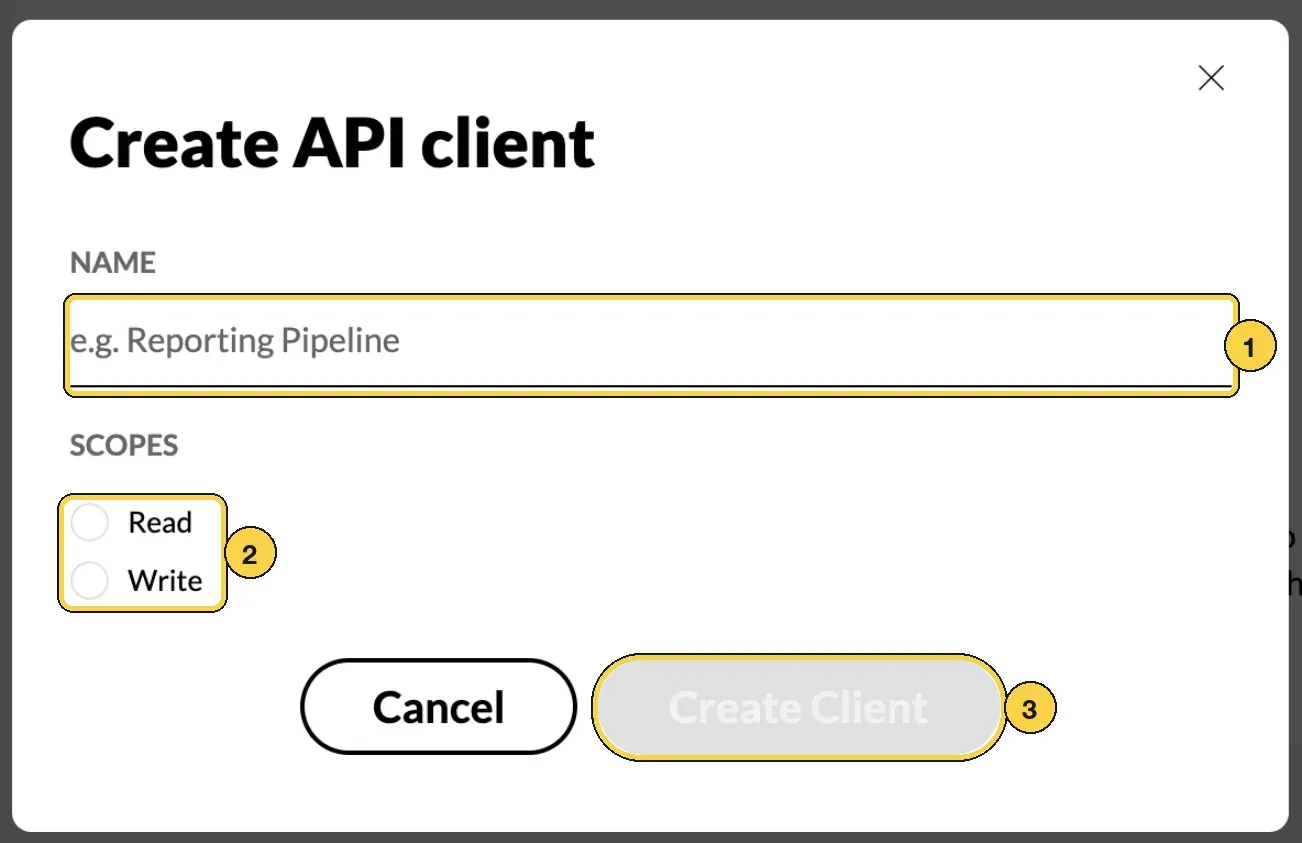
Create API client: 1 Name, 2 Read or Write, 3 Create Client.
In your application
- Request a token. Send the Client ID and Client Secret to the token endpoint. The body must be form-encoded:
curl -X POST https://app.muchskills.com/oauth2/token \
  -H "Content-Type: application/x-www-form-urlencoded" \
  -d "grant_type=client_credentials" \
  -d "client_id=YOUR_CLIENT_ID" \
  -d "client_secret=YOUR_CLIENT_SECRET"
The answer holds access_token, token_type (Bearer), expires_in in seconds, and the granted scope.
- Call the API. Send the token in the
Authorizationheader. This call returns the first 300 profiles:
curl -X POST "https://app.muchskills.com/api/v2/profile/search?skip=0&limit=300" \
  -H "Authorization: Bearer YOUR_ACCESS_TOKEN" \
  -H "Content-Type: application/json" \
  -d "{}"
To read chosen people only, send {"filters": {"emails": ["anna@yourcompany.com"]}} as the body.
- Page through the results. Each answer has a
paginationobject with thetotal. Increaseskipby yourlimitand repeat until you have them all.limitcan be at most 300.
Check it worked
- The token request answers
200with anaccess_token. - The search call answers
200with profiles indataand thetotalinpagination. - On the API Access page, the client's Last used column shows a time instead of Never.
Benefits
What you get
- Your data in your tools. Profiles, skills, certificates, goals and availability flow into reports, data warehouses and other systems.
- Data in without typing. Push certificates, skill levels, goals and absence from the systems where they start.
- Control per integration. Each client has its own scope and can be revoked on its own.
Important to know
Important to know
What you can call. The API has 22 endpoints. Every path below starts with https://app.muchskills.com.
| Method and path | What it does |
|---|---|
| Sign in | |
POST /oauth2/token | Swaps the Client ID and Client Secret for an access token |
| Read people and skills | |
POST /api/v2/profile/search | Profiles with skills, certificates and validated competences, paged with skip and limit up to 300 |
POST /api/v1/profile/search | The older profile search. Use the v2 search instead |
GET /api/v1/profile/{email} | One person's profile |
GET /api/v1/analysis | Analysis lists with their skills, badges and certificates |
| Read availability and utilisation | |
GET /api/v1/availability | Availability per week or month for a date range, paged, up to 50 people per page |
GET /api/v2/profile/pto | Absences for everyone who has any, paged, up to 300 people per page |
GET /api/v1/teams/members/{email} | One person's teams, with utilisation |
| Read goals and certificates | |
GET /api/v1/goals | Every goal in your organisation, paged and filterable |
GET /api/v1/goals/{email} | One person's goals |
GET /api/v1/user-certifications | Certification history for your organisation, including people who have left |
GET /api/v2/auth/file-validation-header | A fresh header for opening private files, such as certificate proofs |
| Write (needs the Write scope) | |
PATCH /api/v2/profile/{email} | Updates profile fields, such as title, department, manager, location, tags and project history |
POST /api/v2/profile/skills/import | Imports skill levels for many people, as their own assessment or as manager validation |
GET /api/v2/profile/skills/import/{jobId} | Shows the progress and result of a skills import |
POST /api/v1/user-certifications/{email} | Adds or renews a certificate, with links or files as proof |
PATCH /api/v1/user-certifications/{periodId} | Corrects a certificate period |
DELETE /api/v1/user-certifications/{periodId} | Removes a certificate period |
POST /api/v1/goals/{email} | Creates a goal for a skill or a certificate |
PATCH /api/v1/goals/{goalId} | Updates a goal |
DELETE /api/v1/goals/{goalId} | Deletes a goal. Achieved goals cannot be deleted |
PUT /api/v2/profile/{email}/pto | Replaces all of one person's absences |
People are identified by email. Use the address each person signs in to MuchSkills with.
The search is a POST. POST /api/v2/profile/search answers a GET with 404. Paging values go in the address as skip and limit, and the filters go in the JSON body.
Tokens last about an hour. There is no refresh token. Request a new token when the old one expires, or when a call answers 401.
Write needs the Write scope. A client with only the Read scope, or a legacy organisation token, gets 403 on write calls.
Absence writes replace everything. PUT /api/v2/profile/{email}/pto replaces all of that person's absences, and an empty list clears them. If an HR integration manages absence for your organisation, the call answers 403: change absences in the HR system instead.
Skills are on a 1 to 9 scale. 1 to 3 is Beginner, 4 to 6 Intermediate and 7 to 9 Expert. Profiles carry the person's own level and, where a manager validated it, the validated level.
Private files need a header. Certificate and education files are private. Responses include an auth object with the header to send when you open them. It expires, and GET /api/v2/auth/file-validation-header gives you a fresh one.
Request limits. Too many requests in a short time get 429 Too Many Requests. Wait and retry with a growing pause, for example 1, 2, then 4 seconds. The goals calls allow one request per second for each token.
Legacy tokens are being retired. If MuchSkills still has an old organisation token for your site, the Integrations page says A legacy API token is still active for this site. Move each integration to an API client.
Revoking is final. Revoke on the API Access page stops a client's credentials at once and cannot be undone.
Common errors
Troubleshooting
| What you see | Why | What to do |
|---|---|---|
400 with "error": "invalid_client" from the token endpoint | The Client ID or Client Secret is wrong, or the body was sent as JSON | Send the body form-encoded and check both values. If the secret is lost, revoke the client and create a new one |
401 Unauthorized | The token is missing, wrong or expired | Request a new token and send it as Authorization: Bearer |
403 on a write call | The client has only the Read scope, or you used a legacy organisation token | Create a client with the Write scope and use its token |
403 on PUT /api/v2/profile/{email}/pto saying absences are managed by an integration | An HR integration syncs absence for your organisation | Change the absence in the HR system |
404 from the profile search | The request was sent as a GET | Send it as a POST with a JSON body, even if it is {} |
404 with user not found | The email is not a member of your MuchSkills organisation | Use the email the person signs in with |
400 with Invalid query parameters | A value is out of range, such as a limit over 300, or a date is not ISO 8601 | Correct the value |
429 Too Many Requests | Too many requests in a short time | Wait and retry with a growing pause |
| The API reference shows a login page | The reference is only open to signed-in MuchSkills users | Sign in, or ask support to give your developer access |
Frequently asked questions
Which plans include the API?
All plans include API access.
Who can create an API client?
An Owner or Admin in MuchSkills, under Team/Org › Settings › API Access. They can then hand the Client ID and Client Secret to your developer or integration partner.
Can our developer read the API reference without a MuchSkills account?
The reference at app.muchskills.com/api/docs is open to signed-in MuchSkills users, as extra protection. If your developer has no MuchSkills login, contact support@muchskills.com and we can give them access.
How long does a token last?
About an hour. There is no refresh token. When a token expires, request a new one with the same Client ID and Client Secret.
We have an old API token from Settings › Integrations. Does it still work?
Legacy organisation tokens are being retired, and they can only read. Create an API client under API Access and switch your integration to it to keep it working.
Should we choose Read or Write?
Choose Read unless your integration needs to change data in MuchSkills. Write is needed to update profiles, import skills, add certificates, manage goals or replace absences. You can create separate clients for separate jobs.
Is there a limit on how many requests we can send?
Yes. If you send requests too fast, the API answers 429 Too Many Requests. Wait and retry with a growing pause. The goals calls allow one request per second for each token.
Can we read project allocations or course activity through the API?
Not today. The API reads each person's teams with their utilisation, availability and absence, but has no endpoint for project allocations or course activity.
What happens if a secret leaks?
Click Revoke on the client in API Access. Its credentials stop working at once, and the action cannot be undone. Then create a new client.