


Rate your skills
- Who
- Everyone
- Where
- My Skills
- Plan
- All plans
Every skill in MuchSkills has a level on a nine-step scale, and what each step means depends on the kind of skill and on how your organisation set it up. Rating honestly is what makes search, gap analysis and team building work, for you and for your colleagues.
The scale
Each skill has three bands, Beginner, Intermediate and Expert, with three steps in each. That makes nine steps. MuchSkills shows your level as the band and the step, for example Beginner (3) or Expert (1).
Different skills use different scales
The nine steps are always there, but what each step means depends on the kind of skill and on what your organisation decided when it set up its skill categories. A language is measured differently from a technical skill, and years in an industry differently from leadership. When you open a skill to rate it, MuchSkills shows the name and description of each step for that skill, so always read them before you choose.
MuchSkills comes with five standard scales, listed below. Your organisation can use them as they are or reword them for its own categories, so the wording in your MuchSkills may differ. If you are unsure which scale a category uses, ask your MuchSkills admin.
Functional skills
The standard scale for technical, professional and most other work skills.
| Level | Name | What it means |
|---|---|---|
| 1. Beginner (1) | Starting | You are curious about the skill and have only just started exploring it. |
| 2. Beginner (2) | Learning | You are starting up actively learning and upskilling yourself. |
| 3. Beginner (3) | Assisting | You are able to utilise this skill at work and assist others at a limited capacity. |
| 4. Intermediate (1) | Applying | You are able to take a more prominent role at work using this skill. |
| 5. Intermediate (2) | Understanding | You have a deep understanding of this skill and are actively working with it. |
| 6. Intermediate (3) | Collaborating | You have applied this skill in multiple contexts, and are able to educate others. |
| 7. Expert (1) | Leading | You can direct others on how to solve complex problems by applying this skill. |
| 8. Expert (2) | Educating | You can mentor, assist, and help others develop this skill. |
| 9. Expert (3) | Mastering | You can conduct keynotes, workshops and innovate around this subject. |
Essential human skills
For skills such as communication, collaboration and leadership.
| Level | Name | What it means |
|---|---|---|
| 1. Beginner (1) | Awareness | You recognise the importance of this skill and have a basic understanding of what it entails. |
| 2. Beginner (2) | Developing | You are beginning to practice this skill in your interactions and are consciously working on improving it. |
| 3. Beginner (3) | Engaging | You apply this skill in specific situations and seek feedback to enhance your effectiveness. |
| 4. Intermediate (1) | Applying | You regularly apply this skill across various situations, demonstrating reliability and intentionality in your approach. |
| 5. Intermediate (2) | Integrating | You have internalised this skill and it is consistently evident in your behaviour. Others start to recognise this skill in your actions. |
| 6. Intermediate (3) | Facilitating | You can guide and support others in developing this skill, often serving as a role model in your environment. |
| 7. Expert (1) | Influencing | You apply this skill effectively in complex situations and influence others to adopt it, embedding it into your team's or organisation's practices. |
| 8. Expert (2) | Mentoring | You are recognised as an expert in this skill, able to mentor others, providing deep insights and fostering growth in others. |
| 9. Expert (3) | Transforming | You are a thought leader in this area, capable of innovating and transforming practices related to this skill on an organisational or industry level. |
Years of experience
For skills measured by how long you have worked with them.
| Level | Name | What it means |
|---|---|---|
| 1. Beginner (1) | Novice | 1 year of professional experience. |
| 2. Beginner (2) | Beginner | 2 years of professional experience. |
| 3. Beginner (3) | Emerging | 3 years of professional experience. |
| 4. Intermediate (1) | Developing | 4 years of professional experience. |
| 5. Intermediate (2) | Proficient | 5 years of professional experience. |
| 6. Intermediate (3) | Experienced | 6 years of professional experience. |
| 7. Expert (1) | Advanced | 7 years of professional experience. |
| 8. Expert (2) | Seasoned | 8 years of professional experience. |
| 9. Expert (3) | Veteran | 9 years (or more) of professional experience. |
Industry experience
For experience of an industry or market.
| Level | Name | What it means |
|---|---|---|
| 1. Beginner (1) | Interested | Very little experience or no experience. |
| 2. Beginner (2) | Beginner | Getting curious about this industry. |
| 3. Beginner (3) | Emerging | Working in real project and gain real experience. |
| 4. Intermediate (1) | Developing | 1+ years of professional experience. |
| 5. Intermediate (2) | Proficient | Some years of professional experience. |
| 6. Intermediate (3) | Experienced | Some years of professional experience, different projects / customers / end users. |
| 7. Expert (1) | Advanced | Many years of professional experience, various projects, various customers / end users. |
| 8. Expert (2) | Seasoned | Many years of professional experience, very good network, contribute in workgroups. |
| 9. Expert (3) | Veteran | Many years of professional experience, very good network, contribute in workgroups, well known person. |
Languages
Based on the European CEFR levels.
| Level | Name | What it means |
|---|---|---|
| 1. Beginner (1) | Pre-A1 | Can understand and use basic expressions, such as greetings and personal information, with heavy support. |
| 2. Beginner (2) | A1 | Can understand and use very basic phrases for immediate needs and interact in a simple way if the other person speaks slowly. |
| 3. Beginner (3) | A2.1 | Can understand basic information in everyday contexts, such as shopping or directions, but with limited vocabulary. |
| 4. Intermediate (1) | A2.2 | Can handle more detailed conversations on routine matters and describe simple past experiences. |
| 5. Intermediate (2) | B1.1 | Can discuss familiar topics and deal with basic travel or work situations with confidence. |
| 6. Intermediate (3) | B1.2 | Can express opinions and feelings in more detail and manage unexpected situations during travel. |
| 7. Expert (1) | B2.1 | Can follow the main ideas of complex texts and conversations, including technical discussions. |
| 8. Expert (2) | B2.2 | Can produce clear, detailed texts and interact fluently with native speakers on a range of subjects. |
| 9. Expert (3) | C1 | Can express ideas fluently and spontaneously without much obvious searching for expressions, even in complex situations. |
Steps
- Open My Skills. Click My Skills in the top menu and choose a category on the left, for example Technical skills.
- Open a skill. Click a skill in your chart. To add a new one, click + Add/Edit and search.
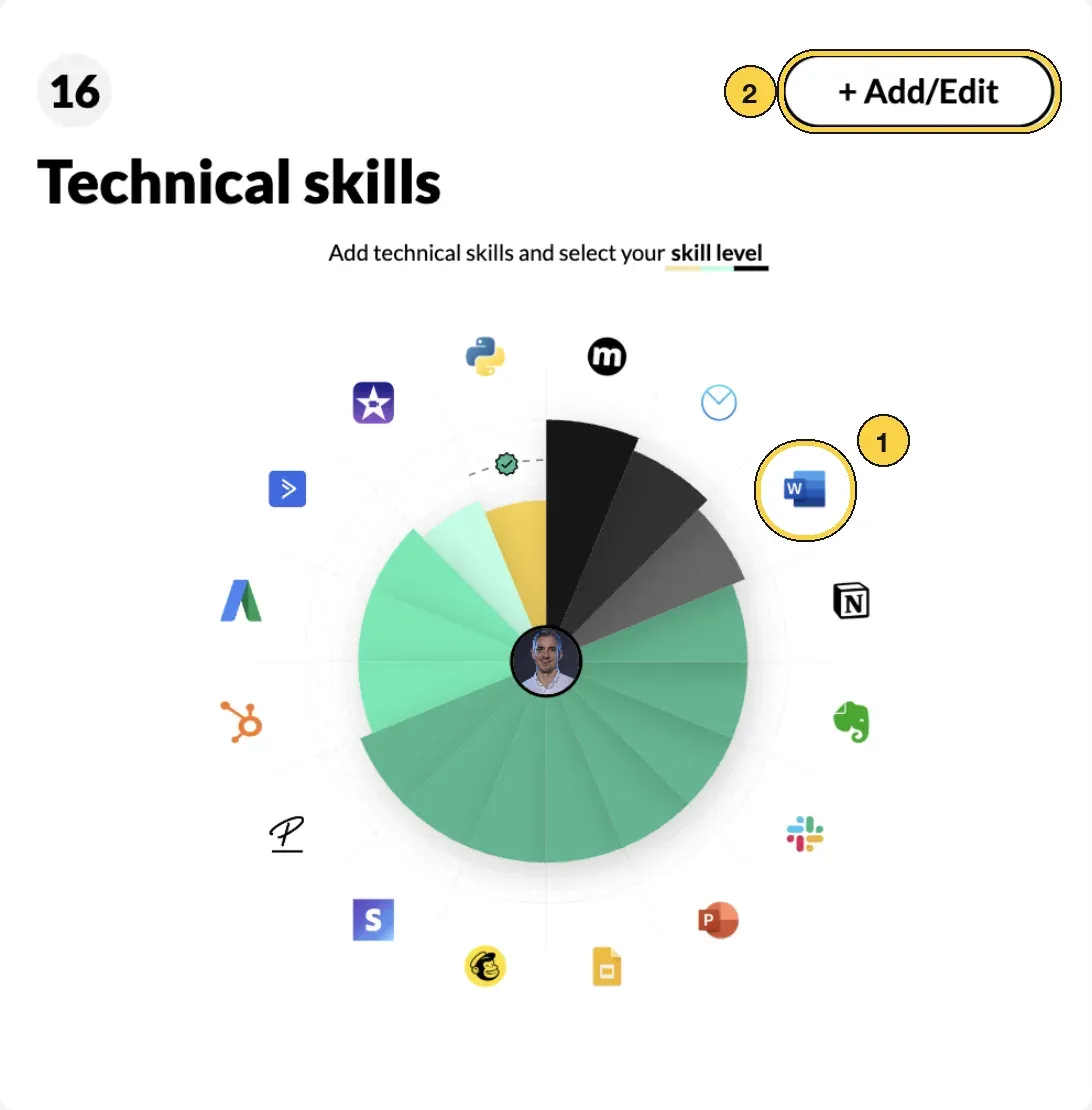
Technical skills in My Skills: 1 click a skill, 2 add new skills with + Add/Edit.
- Read your current level. The skill opens with your level and the date you set it, for example Expert (1) since Dec 2021.
- Pick your step. Click the dot that matches what you can do today. Use the table above if you are unsure.
- Click Done.
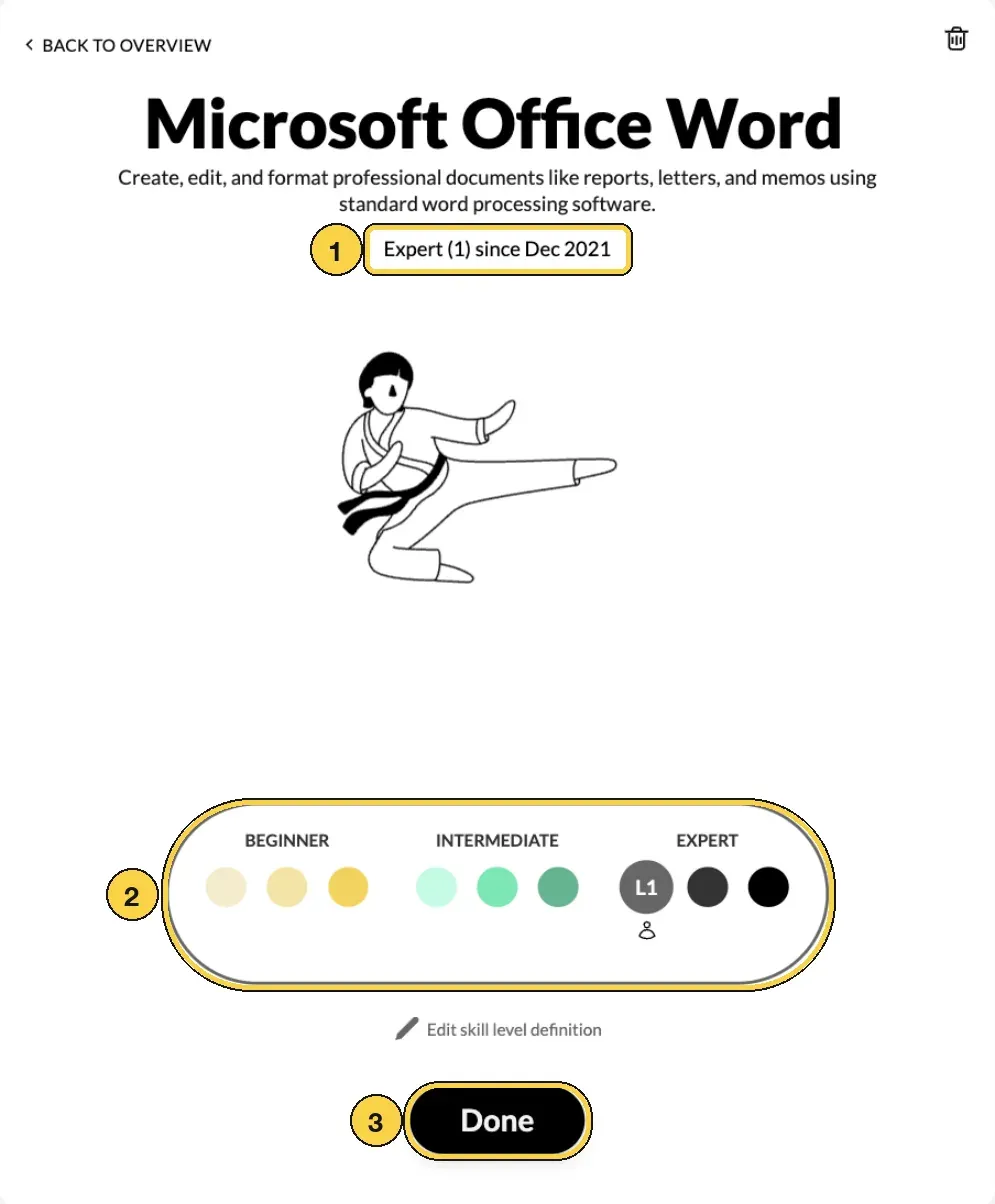
A skill opened for rating: 1 your current level, 2 the nine steps, 3 Done.

Open a skill, pick your step, click Done.
Tips for rating well
- Rate today, not tomorrow. Put where you want to be in a goal instead.
- Use the descriptions. They keep ratings comparable across the organisation, which is what makes search and gap analysis fair.
- Look at your colleagues. When you open a skill, you see who else works with it and at which level. It is a useful sense check.
- Revisit after big moments. A project, a course or a certification is a good reason to update.
Frequently asked questions
Why nine steps and not just Beginner, Intermediate and Expert?
Three bands are too coarse to show growth. Someone who has just started and someone who can already help colleagues are both beginners, but they are not at the same place. The three steps inside each band show that difference, and they let you see progress long before you move up a band.
Why does the scale look different for some of my skills?
Different kinds of skills use different scales. A language follows the CEFR levels, years of experience counts years, and essential human skills run from awareness to transforming how an organisation works. Your organisation chooses the scale for each skill category and can reword it, so always read the step descriptions shown when you rate.
What is the difference between Intermediate (3) and Expert (1)?
At Intermediate (3) you use the skill in many settings and can teach others. At Expert (1) you lead: you direct others on how to solve complex problems with it. If people come to you for direction rather than help, you are at Expert.
Can my manager change my level?
Your manager can set a level when they validate your skills. The small person icon under the selected dot shows who set it: you or your manager.
How often should I update my levels?
Whenever something changes: after a project, a course or a certification. Your dashboard shows when you last updated your skills or certifications.
Who can see my levels?
People in your organisation's MuchSkills workspace. When you open a skill, you also see colleagues who work with it. Your profile is only visible outside your organisation if you choose to make it public.
I can't find a skill I have.
Click + Add/Edit and search. If the skill is not in the database, press Enter to request it and we validate it. If you are trying to add to a list your company set up, ask your MuchSkills admin to add it.
Should I rate where I want to be?
No. Rate what you can do today. Where you want to be belongs in a goal, which you can set in My Growth.