


Udemy Business
Bring your Udemy Business course catalogue into MuchSkills and see what your people are learning. You copy four API credentials from Udemy Business into a form in MuchSkills. Learning activity is matched to MuchSkills members by email address.
- Who
- A MuchSkills Owner or Admin, with a Udemy Business admin
- How it connects
- Self-serve, in Settings › Integrations
- Brings in
- Course catalogue and learning activity
- Matching
- By email address
How to
How it works
MuchSkills reads two things from Udemy Business once a day, overnight: your course catalogue, and your people's learning activity (enrolments, progress and completions). Each Udemy learner is matched to a MuchSkills member by email address.
- Course search and goals. Udemy Business courses appear in course search, and as suggestions when someone sets a development goal.
- My Circle › Learning. Managers see their team's progress next to skills, goals and gaps.
Before you start
- In MuchSkills: the Owner or Admin role.
- In Udemy Business: an admin account. Udemy Business makes its APIs available to Enterprise customers.
- Check email addresses. The email each person uses in Udemy Business should be the address they sign in to MuchSkills with. This is how activity is matched.
- Existing credentials. If another system already uses your Udemy API credentials, plan to copy them. Do not regenerate them.
Steps
In MuchSkills
- Open the Udemy Business connector. Go to Team/Org › Settings › Integrations and click Connect on Udemy Business. The form asks for Subdomain, Account ID, Client ID and Client Secret. Keep this tab open.

Team/Org › Settings › Integrations › Connect on Udemy Business.
In Udemy Business
- Open the API settings. In Udemy Business, click Manage in the upper right, then Settings in the left sidebar, then APIs & integrations. Udemy's guide to finding your REST API credentials
- Find or create the credentials. If credentials already exist, copy them as they are. If not, choose the system you are connecting from the drop-down, or Other if it is not listed, and click Save. Udemy then shows your Client ID and Client Secret.
- Copy four values into MuchSkills.
- Your account name, the first part of your Udemy address, goes into Subdomain. For
acme.udemy.com, enteracme. - Your Account ID, a 6-digit number, goes into Account ID.
- Client ID and Client Secret go into the fields with the same names.
- Your account name, the first part of your Udemy address, goes into Subdomain. For
Back in MuchSkills
- Connect. Click Connect. The status changes from Waiting for credentials to Api Connected.
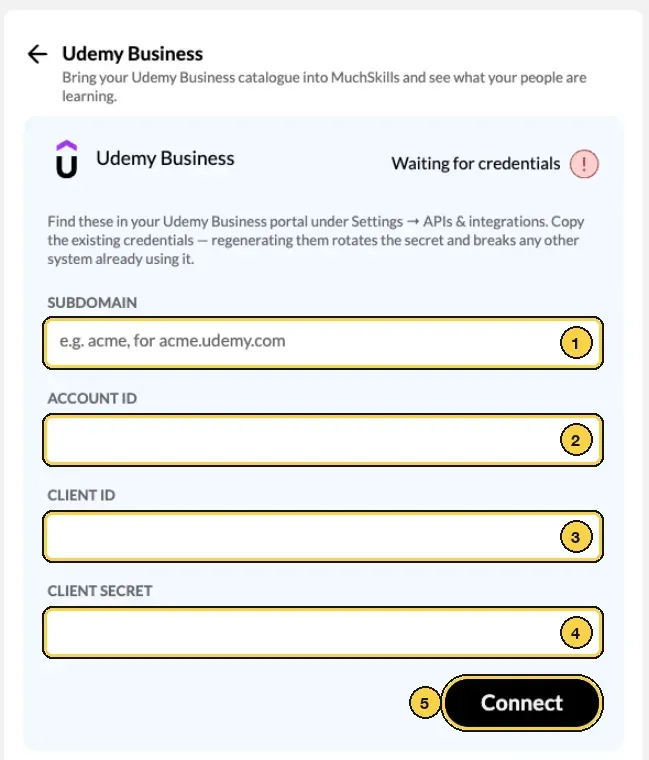
The Udemy Business form: 1 Subdomain, 2 Account ID, 3 Client ID, 4 Client Secret, 5 Connect.
- Start the sync. Click Start Sync. MuchSkills reads your catalogue and your people's learning activity.
Check it worked
- The connector shows Last successful sync and Next scheduled sync.
- The Learner matching summary shows how many MuchSkills members have a Udemy Business account, for example 12 of 15 MuchSkills members have a Udemy Business account.
- Managers see their team's Udemy progress in My Circle, under Learning.
- Udemy Business courses appear when you search for courses.
Benefits
What you get
- Learning next to skills. See what people are learning in the same place as their skills, goals and gaps.
- Your catalogue in MuchSkills. The Udemy Business courses you already pay for are available inside MuchSkills.
- No double entry. Activity arrives from Udemy Business, so nobody reports courses by hand.
Important to know
Important to know
Matching is by email. A learner whose Udemy email is not a MuchSkills sign-in email is counted under the matching summary, and their activity is not shown.
Never regenerate shared credentials. Regenerating the credentials in Udemy Business rotates the secret. Any other system using them, such as your LMS, stops working until it gets the new secret.
A failed read is not zero activity. If a sync cannot read learning activity, the matching numbers show as unknown. The course catalogue is not affected.
Only Udemy admins can see the API settings. If APIs & integrations is missing, your Udemy role or plan does not include it.
Common errors
Troubleshooting
| What you see | Why | What to do |
|---|---|---|
| Invalid Credentials | One of the four values was copied wrongly, or the secret was regenerated in Udemy | Copy the current values from APIs & integrations, paste them in and click Update Credentials |
| None of the 40 learners in Udemy Business match a MuchSkills member, so every learning dashboard will be empty. (with your own number of learners) | The Udemy emails differ from the addresses people sign in to MuchSkills with | Align the email addresses, then click Sync Now |
| The last sync couldn't read learning activity from Udemy Business, so these numbers are unknown rather than zero. | Udemy did not return activity on the last sync | Click Sync Now. If it repeats, check the credentials and contact support |
| Udemy Business reported no learners on the last sync. | Nobody in your Udemy account has learning activity yet, or the credentials belong to another Udemy account | Check the Subdomain and Account ID |
| Your LMS stopped receiving Udemy data | The credentials were regenerated for MuchSkills | Give the new secret to the other system, or ask your Udemy admin which credentials each system uses |
| APIs & integrations is missing in Udemy Business | Your Udemy role is not admin, or your plan does not include APIs | Ask your Udemy Business admin or account team |
Frequently asked questions
Which Udemy Business plan do we need?
Udemy Business makes its APIs available to Enterprise customers, and only Udemy Business admins can open the API settings. If you cannot see APIs & integrations under Settings in Udemy Business, ask your Udemy account team.
We already use our Udemy API credentials for our LMS. Can we use them for MuchSkills too?
Yes. Copy the existing credentials. Do not regenerate them: regenerating rotates the secret and breaks every other system that already uses it, such as your LMS.
How does MuchSkills know whose learning activity is whose?
Activity is matched by email address. A Udemy learner is linked to the MuchSkills member with the same email. Learners whose email matches no member are counted in the summary. Their activity is not shown.
Why do our learning dashboards show nothing?
Usually because no Udemy learner email matches a MuchSkills sign-in email. The Learner matching summary on the connector shows how many members matched. Align the email addresses and run the sync again.
Do employees need to do anything?
No. They keep using Udemy Business as before. Their activity reaches MuchSkills through the connector, as long as their Udemy email is the one they sign in to MuchSkills with.
How often does it sync?
Once a day, overnight. The connector shows when it last synced and when it syncs next. An Owner or Admin can also run it at any time with Sync Now.
Where do people and managers see Udemy courses?
Udemy Business courses appear in course search and in the suggestions when someone sets a development goal. Managers see their team's enrolments, progress and completions in My Circle, under Learning.
Does MuchSkills change anything in Udemy Business?
No. MuchSkills reads your catalogue and learning activity. It does not enrol people, assign courses or change your Udemy settings.