


Find your skill gaps
- Who
- Everyone
- Where
- My Growth › Gap Analysis
- Lists come from
- Your organisation's Analysis lists
- Shows
- Prioritised skills, required levels and certificates
Gap Analysis compares your profile with the role and competence lists your organisation has published. For each list you see what you already match, which skills or certificates are missing, and where to start.
How it works
Your organisation describes roles, teams and competence areas as lists in Team/Org › Analysis, for example "Data Engineer" or "Leadership". Each list names the skills and certificates that matter, marks the most important ones as prioritised, and can set a required level for a skill.
My Growth › Gap Analysis puts each published list next to your profile. On the left is the list itself. On the right, under Your gaps, you see how you match it:
| Bar | What it counts |
|---|---|
| Prioritised | How many of the list's prioritised skills, competences and certificates you have |
| Match (marked Level) | How many skills with a required level you meet at that level or above |
| All | How many of everything in the list you have |
Under the bars, You match ... required skills & certifications for this list sums it up, followed by the skills themselves under Prioritised skills and Remaining skills.
Gap analysis is only as good as your profile. Rate your skills honestly first: Rate your skills.
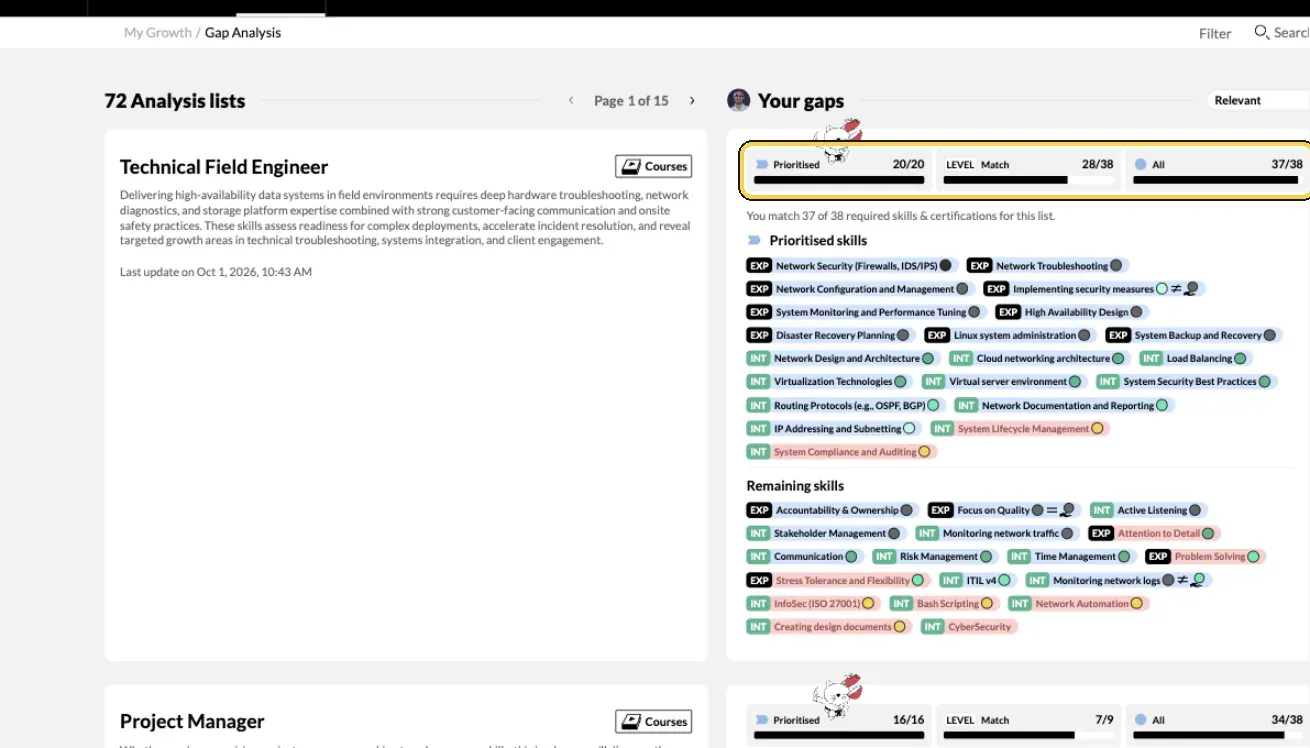
My Growth › Gap Analysis.
Steps
- Open Gap Analysis. Click My Growth in the top menu, then Gap Analysis. The header shows how many lists there are.
- Find the lists that matter to you. Sort by Relevant to see your closest matches first, or by Recently added. Use the search box and filters to find a role or tag.
- Read your match. For a list, look at the Prioritised, Match and All bars. Point at a bar to see exactly what it counts.
- Look at the skills. Under Prioritised skills and Remaining skills, each skill shows whether you have it and at what level.
- Fix what is out of date. Click a skill you have but have not added, or whose level has changed. Pick your level and click Save. Skills without levels have Add skill instead.
- Add missing certificates. Click a certificate in the list to add it with its licence details. See Add your certifications.
- Find learning. Click Courses next to the list name to see learning for the skills and certificates in that list.
- Turn a gap into a goal. Pick one or two prioritised gaps and set a goal for each in My Growth › Goals. See Set a development goal.
Check it worked
- After you save a level, the bars and You match ... update.
- When you have every prioritised skill in a list, the Prioritised bar is full.
Tips
- Start with prioritised gaps. They matter most for that role or area.
- Look sideways, not only up. Lists for other roles show where your skills could take you next.
- Use it before a one-to-one. Bring one list and one or two gaps to talk through with your manager.
- Check back after changes. Lists are updated over time; each one shows when it was last updated.
Troubleshooting
| What you see | Why | What to do |
|---|---|---|
| No data to show here yet | No lists have been published in your organisation yet | Nothing to do now. Ask your manager whether role or competence lists are planned |
| No data to show | Your search or filters hide every list | Clear the search and filters |
| A skill you have shows as missing | It is not on your profile, or your level is below the required level | Click it in your gap card and add it or update your level |
| A message about upgrading when you add a skill | Your organisation has reached its plan's limit for custom skills | Tell your MuchSkills admin |
Frequently asked questions
Why is my Gap Analysis empty?
Your organisation has not published any role or competence lists yet. Lists are created by admins or managers in Team/Org › Analysis. Until then, the page shows No data to show here yet.
Does a gap mean I am not doing my job well?
No. Lists describe roles and competence areas across your organisation, including roles you do not have today. A gap simply shows where you could grow if you want to.
What is the difference between Prioritised skills and Remaining skills?
Prioritised skills are the ones your organisation marked as most important for that list. Remaining skills are useful but less critical. Start with the prioritised ones.
What does Match mean?
Some skills in a list have a required level. Match counts how many of those you meet at or above the required level. Prioritised and All count the skills you have, whatever your level.
I have the skill, but it shows as a gap.
Either it is not on your profile yet, or your level is below the level the list asks for. Click the skill in your gap card to add it or update your level. If you know it under another name, check the skill's description.
Can my manager see my gap analysis?
Yes. Your manager sees it on your page in My Circle, under Gap. Admins can see it too.
Can I see lists for roles other than my own?
Yes. Every list your organisation has published shows here. Sort by Relevant to see the closest matches first, or search and filter by tags.