


Show what gives you energy with Skill Will
- Who
- Everyone
- Where
- You › My Skills › Skill Will
- How many
- Up to 16 skills
- Used to be called
- Job Focus
Your skills show what you can do. Skill Will shows what you love doing. Pick up to 16 skills you are really good at and enjoy using, then make the bubbles bigger or smaller until the picture shows where your energy is. It takes a few minutes and gives you something real to bring to your next one-to-one.
How it works
Skill Will sits in You › My Skills, next to your Technical skills. You pick up to 16 skills you are really good at and enjoy using. Each one becomes a bubble. Make a bubble bigger when that skill gives you more energy, and smaller when it gives you less, until the biggest bubbles show what you would most like to do more of.
Skill Will used to be called Job Focus. Anything you added there is already in place.
Your manager sees your Skill Will in My Circle, and admins see a summary for the whole organisation in Workforce › Overview. Together with your skills, it helps your manager and your organisation match people to work they are good at and want to do.
Steps
Pick your skills
- Open Skill Will. In the side menu, click You, then My Skills, then Skill Will.
- Find the panel What's your Skill Will. It sits on the right of the page.
- Search to add. Type a skill in the search box and pick it from the list. If it is not there, press Enter to add it as a new skill.
- Add up to 16 skills you are really good at and enjoy using. To remove one, click the x on its chip.
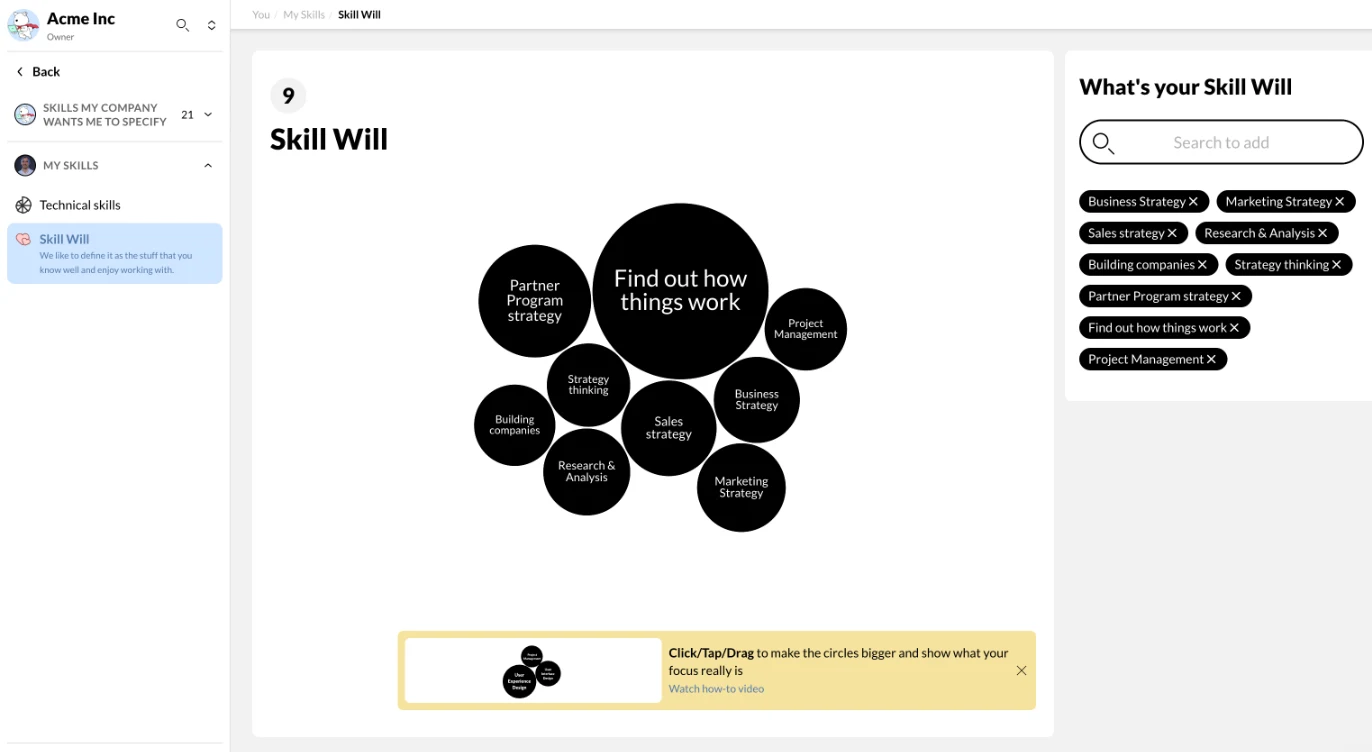
Show where your energy is
- Size the bubbles. Click, tap or drag a bubble to make it bigger or smaller. The biggest bubbles are the skills that give you the most energy.
- Step back and look. If the picture does not feel like you yet, change the sizes until it does.
Check it worked
- Your skills show as bubbles on the Skill Will page, in the sizes you set.
- The number at the top of the page shows how many skills you have in Skill Will.
- On Home, Skill Will has its own bar in your skills over time.
Tips
- Be honest, not complete. A few skills that really give you energy say more than a long list of skills you are only good at.
- Bring it to your next one-to-one. Ask for more of what is in your biggest bubbles. See Hold great one-to-ones.
- Rate the same skills in your profile. Skill Will shows what you enjoy; your skills profile shows your level. See Rate your skills.
- Managers: open a person in My Circle and click View skills summary, top right, to see their Skill Will before a development talk. See Use My Circle to coach your team.
- Admins: see what your organisation loves doing in Workforce › Overview. Scroll to the Skill Will card and use the filters at the top right to look at one part of your organisation.
Troubleshooting
| What you see | Why | What to do |
|---|---|---|
| You want to add a 17th skill | Skill Will holds up to 16 skills | Remove the one that gives you the least energy, then add the new one |
| You cannot find Skill Will in the menu | My Skills is folded in | Click You, then My Skills; Skill Will sits under Technical skills |
Frequently asked questions
What is Skill Will?
The skills you know well and enjoy working with. Your skills profile shows what you can do; Skill Will shows what gives you energy, so the right projects and development talks can start from both.
Where did Job Focus go?
Job Focus is now called Skill Will. Anything you added to Job Focus is already in place in Skill Will.
How many skills can I add?
Up to 16. Pick the ones you are really good at and would happily use every day, rather than everything you can do.
What do the bubble sizes mean?
The bigger the bubble, the more energy that skill gives you. Click, tap or drag a bubble to make it bigger or smaller.
Who can see my Skill Will?
Your manager sees it in My Circle under View skills summary. Admins see a summary for the whole organisation in Workforce › Overview.
The skill I want is not in the list. What do I do?
Type it in the search box and press Enter to add it as a new skill.
How often should I update it?
Whenever what you enjoy changes, and before every one-to-one or development talk. It takes a minute.